Introduction
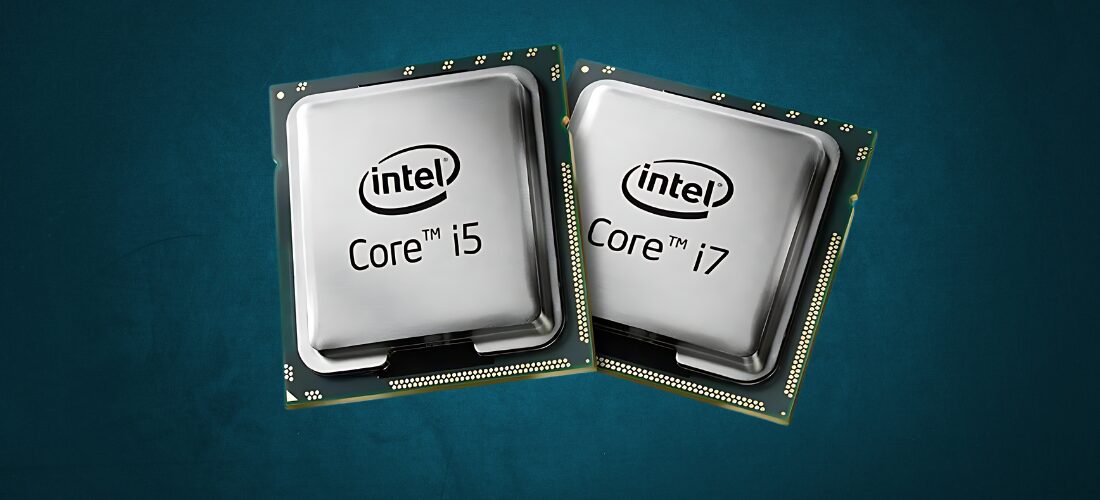
When it comes to selecting a new computer or upgrading your current one, one of the most important decisions revolves around the processor or CPU. Intel’s Core i5 and Core i7 processors are two of the most popular choices for both desktop and laptop users. But what are the differences between them, and which one is the best fit for your needs? This guide will break down the key aspects of i5 vs. i7 processors to help you make an informed decision, whether you’re building a PC for gaming, content creation, or daily work.
Understanding the Key Differences Between Intel i5 and i7 Processors
When comparing Intel’s i5 and i7 processors, one of the main distinctions lies in their performance characteristics and target user needs. Intel i7 CPUs generally offer higher clock speeds and more processing threads than i5 models, which can translate into better multitasking and smoother handling of demanding applications such as video editing, 3D rendering, and high-end gaming. On the other hand, i5 processors typically provide excellent performance for everyday computing tasks like browsing, streaming, and office work, making them a solid choice for budget-conscious users or those whose workloads do not require intensive computing power. By evaluating the differences in core count, cache size, and performance capabilities, users can better decide which processor aligns with their performance expectations and usage scenarios.
What Are Intel Core i5 vs. i7 Processors?
The Intel Core i5 and Intel Core i7 are part of Intel’s Core processor lineup, which is designed for mainstream consumer computing. Each processor generation offers different models for both desktops and laptops, with each model catering to specific use cases.
Intel Core i5 processors are typically positioned as mid-range options, providing solid performance for everyday tasks like web browsing, office work, light gaming, and occasional photo or video editing.
Intel Core i7 processors are high-end options aimed at power users. They offer better multitasking, faster performance, and enhanced capabilities for gaming, video editing, 3D rendering, and more.
Key Differences Between i5 vs. i7 Processors
1. Core Count and Threading
One of the most significant differences between the i5 and i7 lies in the core count and threading.
Core i5 processors usually feature 4 to 6 cores in laptops and 6 to 10 cores in desktop models. Many modern i5 processors feature Hyper-Threading, which allows each core to handle two threads, doubling the number of threads.
Core i7 processors typically have 8 to 12 cores (or more in some high-end models), with Hyper-Threading enabled on most models, giving it an advantage in handling multiple tasks at once.
For everyday tasks, both CPUs perform well. However, if you frequently run demanding applications that benefit from multiple cores, such as video editing or 3D rendering, an i7 will offer better performance due to its higher core and thread count.
2. Clock Speed and Turbo Boost
Clock speed refers to how fast a processor executes instructions, measured in GHz. Both the i5 and i7 processors use Intel’s Turbo Boost Technology, which allows the processor to dynamically increase its clock speed when required for demanding tasks.
- Core i5 processors usually have base clock speeds between 2.9 GHz and 3.8 GHz, with Turbo Boost speeds reaching up to 4.5 GHz.
- Core i7 processors typically have higher base clock speeds, starting from around 3.0 GHz and going up to 4.7 GHz or higher with Turbo Boost.
- In general, the i7’s higher clock speeds give it an edge in scenarios where rapid processing is required, such as high-end gaming, compiling code, or running virtual machines.
3. Cache Size
The cache is a small amount of extremely fast memory located on the CPU, used to store frequently accessed data. A larger cache allows the processor to handle more data, improving performance in certain tasks.
- Core i5 processors usually come with a cache size ranging from 6MB to 12MB.
- Core i7 processors offer larger caches, typically from 8MB to 16MB.
- For general use, this difference isn’t very noticeable, but for heavy multitasking or data-intensive applications, the extra cache in an i7 can lead to smoother performance.
4. Integrated graphics
Both i5 and i7 processors typically come with integrated graphics, specifically Intel’s UHD Graphics or Iris Xe Graphics in the latest generations. Integrated graphics are suitable for basic gaming, media playback, and light creative work, but they are no substitute for a dedicated GPU.
- Core i5 processors generally offer UHD Graphics, which are adequate for light gaming and casual video editing.
- Core i7 processors, especially those in laptops, often feature Iris Xe Graphics, providing better performance for more graphically demanding tasks.
- If you plan to run graphically intensive applications like 3D modeling or AAA gaming, it’s better to pair either processor with a discrete GPU, but for those who rely solely on integrated graphics, i7 will offer better results.
5. Power Consumption and Thermal Output
The more powerful a processor is, the more power it consumes, which can affect battery life in laptops and generate more heat in desktops.
- Core i5 processors generally have a lower TDP (Thermal Design Power), meaning they consume less power and generate less heat, making them a good choice for laptops or systems where efficiency is a priority.
- Core i7 processors, while more powerful, tend to have a higher TDP. This translates to more power usage and higher heat output but also means better performance, especially in high-demand applications.
- For laptop users, choosing an i5 can help preserve battery life, while desktop users who don’t mind cooling considerations might prefer the i7 for maximum performance.
Use Cases: i5 vs. i7 – Which Should You Choose?
1. Everyday Use & Light Gaming
If your primary activities involve web browsing, streaming, office work, or light gaming, an Intel Core i5 processor will be more than sufficient. It offers excellent value for users who want a smooth experience without needing to pay extra for power they won’t use.
2. Content Creation & Heavy Multitasking
If you frequently run heavy software such as video editing programs, photo editing tools, or 3D rendering applications, you’ll benefit from the higher core count, faster clock speeds, and larger cache of the Intel Core i7. The additional threads can handle demanding workloads more effectively, allowing for faster rendering and smoother multitasking.
3. Gaming
For most modern games, an i5 processor paired with a strong GPU will handle 1080p and even 1440p gaming quite well. However, if you’re aiming for 4K gaming or you plan to stream while gaming, the extra power of an i7 can help maintain smoother frame rates and prevent bottlenecks, especially when running multiple tasks.
4. Professional Workstations
For professional users working with virtual machines, data science, or software development, an i7 processor is the better choice. The added cores and threads, higher clock speeds, and more cache make it ideal for computationally demanding tasks.
Price Comparison
As expected, i5 processors are more affordable than their i7 counterparts. For users on a budget, an i5 offers excellent performance for the price.
- Intel Core i5 prices typically range between $150 to $250.
- Intel Core i7 processors, being more high-end, range from $300 to $450 or more, depending on the specific model and generation.
If your budget allows, investing in an i7 can future-proof your system, but if cost-efficiency is your primary concern, the i5 offers great performance for the majority of everyday users.
Conclusion
Choosing between the Intel Core i5 and Core i7 depends largely on your specific needs.
If you’re a casual user who needs a processor for everyday tasks, office work, or light gaming, the i5 is more than enough to keep things running smoothly. If you’re a power user who regularly runs demanding applications, handles large files, or wants to future-proof their system, the i7 is the way to go. Whichever option you choose, both processors from Intel’s Core lineup offer outstanding performance and reliability, making either an excellent choice for a wide range of users.
If you want to read an interesting article about it, explore our “Tech” category.
FAQs
Yes, you can upgrade from an i5 to an i7, but you need to ensure that your motherboard supports the i7 model you plan to upgrade to.
For most games, an i5 with a good GPU is sufficient. However, an i7 may offer better performance for 4K gaming, streaming, or gaming with multiple tasks running.
The i5 generally offers better battery life as it consumes less power compared to the i7, which tends to have a higher power draw.
For general use like browsing, streaming, or office work, the performance difference between i5 and i7 is minimal. The i7 shines in more demanding, resource-intensive tasks.
Both the i5 and i7 processors can last several years before needing an upgrade. However, an i7 might provide more longevity for power users due to its higher performance capabilities.