As organisations continue to generate larger volumes of digital information, managing storage efficiently has become just as important as expanding it. Every year, businesses create new documents, media files, engineering drawings, customer records, reports, and application data. Much of this information remains valuable long after it is created, yet only a small percentage is accessed regularly.
Despite this, many organisations continue storing all of their data on expensive primary storage. Over time, this approach leads to increasing infrastructure costs, longer backup windows, more complex administration, and growing pressure on file servers.
Hierarchical Storage Management (HSM) was developed to solve this challenge.
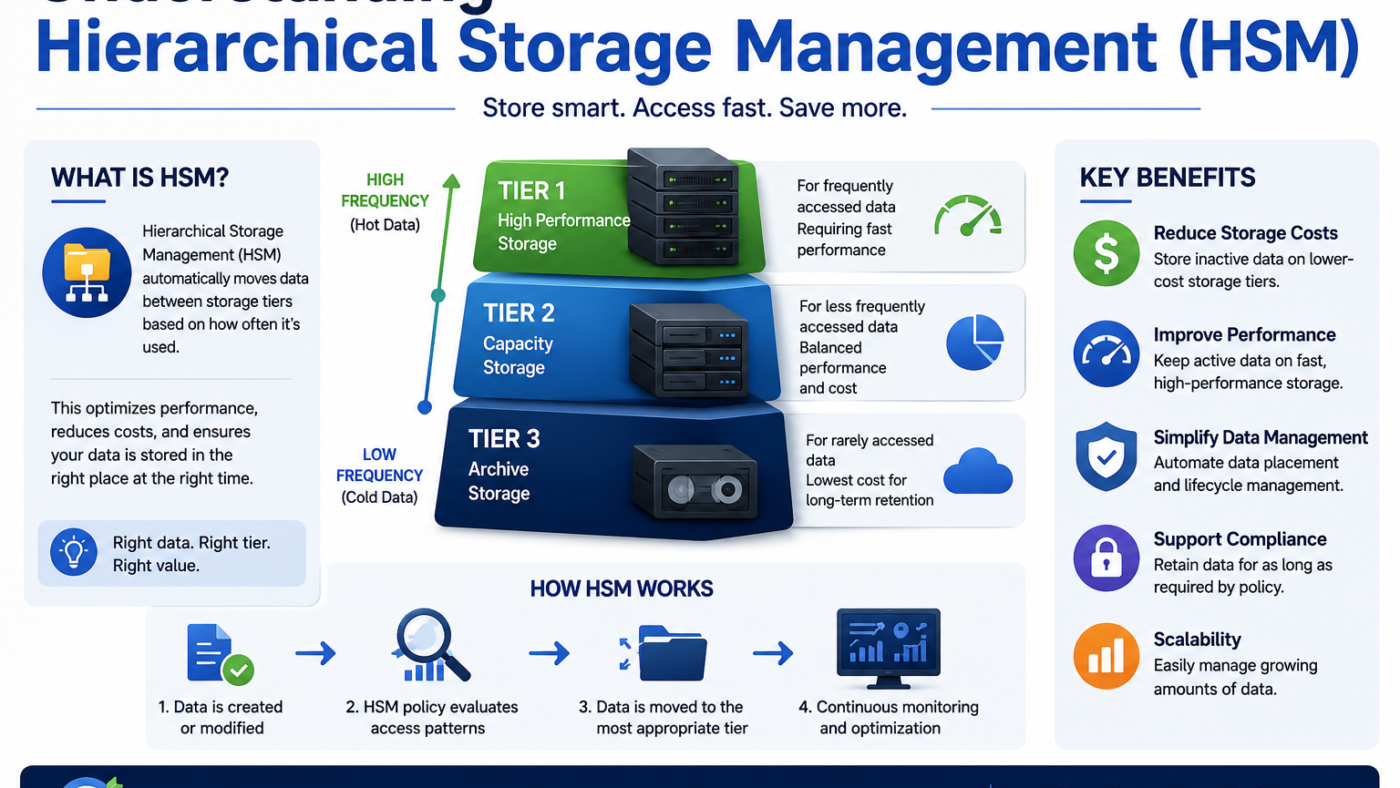
Rather than treating every file as equally important, HSM automatically moves data between different storage tiers based on policies such as age, usage, or business requirements. Frequently accessed files remain on high-performance storage, while inactive data is relocated to more economical storage without necessarily changing how users access it.
Although the concept has existed for decades, modern HSM has evolved considerably. Today’s solutions are far more intelligent, easier to manage, and better suited to organisations dealing with rapidly growing volumes of unstructured data.
This article explains what Hierarchical Storage Management is, how it works, its advantages and limitations, and why it continues to play an important role in modern enterprise storage strategies.
What Is Hierarchical Storage Management?
Hierarchical Storage Management, commonly abbreviated to HSM, is a storage management technique that automatically moves files between different types of storage according to predefined policies.
The basic principle is simple.
Not all files require the same level of storage performance.
A document that employees edit every day benefits from fast, high-performance storage. A project completed five years ago may still need to be retained, but it probably doesn’t require the same level of performance or cost.
HSM recognises these differences and places data on the most appropriate storage tier throughout its lifecycle.
Rather than forcing administrators to move files manually, HSM automates the process based on rules established by the organisation.
Understanding Storage Tiers
At the heart of HSM is the concept of storage tiers.
Each tier is designed to balance cost, performance, and accessibility.
A typical hierarchy might include three levels.
Tier 1: Primary Storage
This is the fastest and most expensive storage.
It is reserved for:
- Active projects
- Frequently accessed documents
- Databases
- Business-critical applications
- Current operational files
Employees interact with this data every day, so fast response times are essential.
Tier 2: Secondary Storage
Secondary storage offers lower costs while still providing relatively quick access.
This tier often contains:
- Completed projects
- Older departmental documents
- Historical reports
- Files accessed only occasionally
For many organisations, this storage may consist of NAS appliances, secondary file servers, or other lower-cost platforms.
Tier 3: Archive or Long-Term Storage
The final tier stores information that must be retained but is rarely accessed.
Examples include:
- Regulatory records
- Historical project documentation
- Legacy business information
- Long-term customer records
Although retrieval may take slightly longer, this approach significantly reduces pressure on expensive production storage.
How HSM Works
Modern HSM systems continuously monitor stored data and evaluate it against predefined policies.
These policies commonly consider factors such as:
- Last access date
- File age
- File size
- File type
- Department ownership
- Retention requirements
For example, an organisation might configure rules stating that files not accessed for twelve months should automatically move from primary storage to archive storage.
The movement happens in the background without requiring manual intervention.
Depending on the implementation, users may still see the file in its original location, even though the underlying data has been relocated. When the file is requested, the system retrieves it automatically from the appropriate storage tier.
From the user’s perspective, very little changes.
Why Businesses Adopt HSM
Most organisations introduce HSM for one simple reason: storage growth.
As file servers expand year after year, continuously purchasing additional high-performance storage becomes increasingly expensive.
HSM offers an alternative by ensuring that premium storage is reserved for active data while less frequently used information moves elsewhere.
The benefits extend well beyond reducing storage consumption.
A well-designed HSM strategy can also:
- Improve storage efficiency
- Extend the lifespan of existing infrastructure
- Reduce backup requirements
- Improve system organisation
- Simplify long-term data management
Instead of continually reacting to storage shortages, businesses can manage information proactively throughout its lifecycle.
HSM and File Archiving
Hierarchical Storage Management and file archiving are closely related concepts, but they are not exactly the same.
HSM describes the broader process of automatically moving data between storage tiers according to policies.
File archiving is one possible outcome of that process.
For example, inactive files identified by an HSM policy may be relocated to archive storage while remaining accessible to users when required.
Modern file archiving platforms often incorporate HSM principles by automating decisions about where data should reside based on usage patterns and retention rules.
Solutions such as ArchiverFS are examples of software that applies these concepts specifically to Windows file servers, allowing inactive files to be relocated while preserving user access through familiar folder structures.
HSM Is Not the Same as Backup
One of the most common misunderstandings is assuming that HSM replaces backup.
It does not.
The purpose of HSM is to optimise where information is stored.
The purpose of backup is to protect that information against accidental deletion, hardware failure, ransomware, or disaster.
Even files that have been moved to archive storage still require appropriate protection according to the organisation’s backup and recovery strategy.
An effective storage environment typically combines:
- Backup for recovery
- HSM for storage optimisation
- Archiving for long-term retention
Each technology performs a different role within the wider information management strategy.
The Advantages of Hierarchical Storage Management
The biggest strength of HSM is that it aligns storage resources with business needs.
Instead of treating every file identically, organisations can automatically ensure that active information remains on premium storage while inactive data moves to lower-cost environments.
This delivers several important advantages.
One of the most immediate benefits is reduced infrastructure spending. Businesses often discover that a significant percentage of their stored information has not been accessed for several years. Moving this data away from production storage delays expensive hardware upgrades and allows existing storage investments to last longer.
HSM also improves operational efficiency.
Smaller production file systems generally complete backups more quickly, require less administrative effort, and are easier to manage. Users also benefit from cleaner storage environments that contain fewer outdated files competing with active business information.
From a governance perspective, HSM supports better lifecycle management by ensuring information is stored according to consistent policies rather than individual user decisions.
Potential Challenges
Like any enterprise technology, HSM requires thoughtful planning.
Poorly designed policies can result in files being moved too aggressively or retained on expensive storage for longer than necessary.
Organisations should carefully consider:
- Business access patterns
- Compliance obligations
- Department requirements
- Recovery expectations
- User workflows
Successful HSM depends less on the technology itself and more on establishing sensible lifecycle rules.
Another consideration is user communication.
Although modern HSM systems are designed to minimise disruption, employees should understand why older files may occasionally take slightly longer to open than recently used documents.
Clear expectations help ensure a smooth transition.
HSM in Modern Enterprise Environments
Today’s storage environments are far more diverse than they were when HSM was first introduced.
Organisations may use combinations of:
- On-premises storage
- Network-attached storage (NAS)
- Storage area networks (SAN)
- Private cloud infrastructure
- Public cloud services
- Object storage
Modern HSM platforms are designed to work across multiple storage technologies rather than relying on a single infrastructure type.
This flexibility allows organisations to create storage strategies that balance performance, resilience, and cost while adapting to changing business requirements.
Companies such as MLtek have contributed to this evolution by focusing on intelligent file lifecycle management rather than simply increasing storage capacity. The broader industry trend is moving away from reactive storage expansion and towards automated policy-driven management that keeps active data where it performs best while relocating inactive information transparently.
Is HSM Right for Every Organisation?
Not every business requires a sophisticated HSM implementation.
Small organisations with relatively modest storage requirements may be able to manage growth using simpler storage practices.
However, HSM becomes increasingly valuable when organisations begin experiencing challenges such as:
- Rapid file server growth
- Increasing storage costs
- Longer backup windows
- Large volumes of inactive data
- Complex compliance requirements
- Frequent storage upgrades
For businesses facing these issues, HSM can provide a structured and sustainable way to manage storage over the long term.
Best Practices for Implementing HSM
Organisations considering HSM should begin by understanding their existing data rather than implementing policies immediately.
A successful rollout often includes the following steps:
- Analyse file age and access patterns before creating policies.
- Classify data according to business value rather than file size alone.
- Develop clear retention policies across departments.
- Test lifecycle rules with smaller data sets before expanding organisation-wide.
- Review policies regularly as business requirements evolve.
Technology can automate movement between storage tiers, but effective lifecycle management always begins with understanding how the organisation actually uses its information.
Conclusion: HSM Is About Smarter Storage, Not More Storage
Hierarchical Storage Management is not simply a method for saving disk space. It is a strategy for ensuring that every piece of information is stored in the most appropriate place throughout its lifecycle.
By automatically moving inactive files away from expensive primary storage while keeping them available when needed, HSM helps organisations control storage growth, improve operational efficiency, and make better use of existing infrastructure.
As businesses continue generating larger volumes of digital information, the challenge is no longer just storing more data. It is storing data intelligently.
For organisations looking to move beyond the endless cycle of buying additional storage, Hierarchical Storage Management provides a proven framework for balancing accessibility, performance, and long-term cost efficiency.
Apart from that if you want to know about What Is an Agent-Free Storage Solution? then please visit our Tech Category.